
800.com’s Call Transcription feature automatically transcribes your recorded calls into searchable text, making it easy to review, document, and analyze your conversations.
Call Transcription converts phone conversations into written text. Having transcripts of calls can help with record-keeping, customer service, employee training, and accessibility.
Important Note: Call Transcription requires Call Recording to be enabled first. Call Recording is a free feature and you can enable it at the same time and in the same place as Call Transcription.
Pricing: Call transcription is an optional add-on feature between .03 - .10 /minute depending on your plan. Pro-Plan comes with 1,000 free minutes/month. **See full pricing info below
Enable Call Transcription
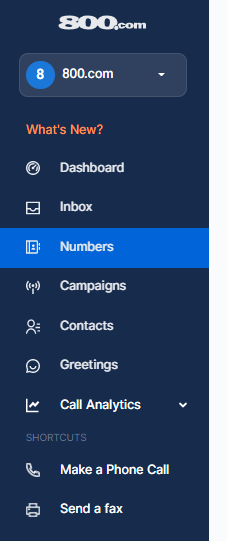
The call transcription and call recording features are disabled, by default. You can enable the features by logging into your dashboard and selecting the "Numbers" category from the column on the left.
From here you can click on the number you wish to update and scroll down to the "General Settings" category, at the top, you will see the option to enable the call recording and call transcription feature. Toggle the "Call Recording" feature on first, this is a free feature. Then toggle "Call Transcription" on. This will activate the transcription functionality. You will be prompted to accept the billing conditions.**
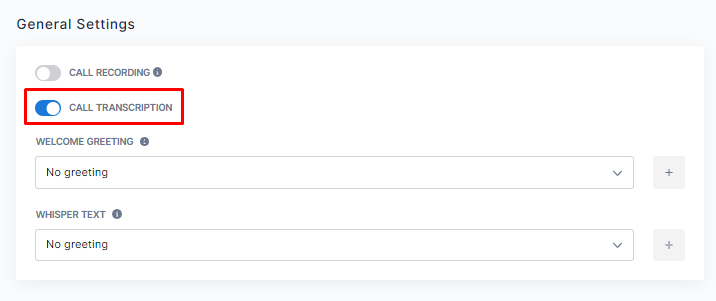
*Please note: Turning on Call Transcription automatically turns on Call Recording. Your business is responsible for following your local laws and regulations pertaining to recording calls.
**Billing Information
Our Pro plan includes 1,000 transcribed minutes per month, when enabled, and charges 3 cents ($0.03) for every transcribed minute once the included minutes are depleted.
Our Unlimited plan allows you to enable call transcription for 3 cents ($0.03) for every transcribed minute.
Our Personal plan plan allows you to enable call transcription for 3 cents ($0.10) for every transcribed minute.
Check out our full guide on Call Transcriptions HERE