---
title: Getting Started - A Step by Step Guide
description: A working guide on how to set your new 800.com account up for success! Congratulations on getting your new business phone number! Here are some q
---
[Skip to content](https://support.800.com/en-us/hc/articles/31137400822669-getting-started-a-step-by-step-guide#main-content)
[](https://www.800.com/)
- [Call us (800) 800-4321](tel:+18008004321)
- [Sign in](https://support.800.com/hc/en-us/signin)
Open main navigation
Close main navigation
- [Call us (800) 800-4321](tel:+18008004321)
- [Sign in](https://support.800.com/hc/en-us/signin)
- [Submit a request](mailto:support@800.com)
[Submit a request](mailto:support@800.com)
800.com Help Center
- There are no suggestions because the search field is empty.
1. [800 Support Center](https://support.800.com/en-us/hc?hsLang=en-us)
2. [Getting Started](https://support.800.com/en-us/hc/getting-started?hsLang=en-us)
3. [Onboarding Basics](https://support.800.com/en-us/hc/getting-started?hsLang=en-us#onboarding-basics)
August 8, 2026
# Getting Started - A Step by Step Guide
### A working guide on how to set your new 800.com account up for success! 
Congratulations on getting your new business phone number! Here are some quick steps to help you get started and make sure your number is visible to all your customers.
## **📘 800.com Getting Started Guide**
**Your Step-by-Step Playbook to Launch, Integrate, and Succeed with Your New Number**
## **🔑 Key Contact and Account Information**
- Dashboard Login - [https://app.800.com/login](https://app.800.com/login)
- Support Email - [Support@800.com](mailto:Support@800.com)
- Support Phone Number - 1-800-800-4321
- HelpDesk Articles - [https://support.800.com/hc/en-us](https://support.800.com/hc/en-us?hsLang=en-us)
- 800.com Blog - [https://www.800.com/blog/](https://www.800.com/blog/)
- App Download Link - [https://www.800.com/mobile-app](https://www.800.com/mobile-app)
## **🧭 Step 1: Explore this Getting Started Guide**
**Goal:** Learn the full scope of what your number can do.
🔹 Key actions:
- Understand number dashboard features
- Learn about call routing, texting, campaigns, etc.
- Know how to configure your settings for best performance
## **🍿 Step 2: Watch the Onboarding Video**
**Goal:** Get familiar with your dashboard and key features.
🔹 Watch the full welcome video [**HERE**](https://www.loom.com/share/ab9285505f044b40be891c9c5784742b?sid=33b6b19b-f167-4c40-8741-ba8884d2977f) to explore:
- Navigating the dashboard
- SMS / Texting
- Number configuration / VM setup
- What’s new
- Settings and help guides
📌 *Includes timestamps for faster reference.*
👉 [**Schedule a call**](https://calendly.com/800-support/30min) with an onboarding specialist if you need help during setup.
## 🔧 **Step 3: Confirm, Configure, and Personalize Your Call Settings**
**Goal:** Set up your number and make sure it’s working for your needs
All setup is done in your dashboard at[app.800.com](https://app.800.com/)
### **What’s Already Configured:**
- Your new number forwards to your account phone number
- Call forwarding method is pre-set
- Caller ID displays your customer’s number
- Email alerts are active for voicemails and texts
- A general voicemail greeting includes your business name
### **How to Personalize:**
- Go to [**Dashboard \> Numbers**](https://app.800.com/c/numbers) and select your number
- Set your ring time (⏱ we recommend 20-25 seconds = ~4–5 rings)
- Adjust your call forwarding method (especially for multiple numbers)
- Record a personal voicemail greeting
- Full Guide [HERE](https://support.800.com/en-us/hc/articles/32691903577229-getting-started-series-configure-and-personalize-your-call-settings?hsLang=en-us)
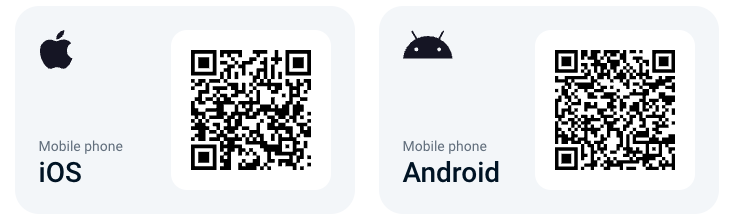
## **📱 Step 4: Download the Mobile App**
**Goal:** Stay connected with your customers on the go.
🔹 Benefits:
- Manage texts and calls anytime
- Access to dashboard insights
- iOS and Android compatible
📲 Available on App Store and Google Play - Click [HERE](https://www.800.com/mobile-app)
📸 Scan the QR code below to install directly
## **🧑💼 Step 5: Deploy Internally Across Your Team**
**Goal:** Keep your team aligned and up to speed.
- Assign extensions to employees and have them download the app
- Make an internal announcement
- Ask team members to update any external listings
- Clean up outdated voicemail recordings or call templates
Full Guide [HERE](https://support.800.com/en-us/hc/articles/36427599366925-getting-started-series-how-to-announce-your-new-business-number?hsLang=en-us)
## **🌐 Step 6: Update Your Number Everywhere Online**
**Goal:** Make sure your number is consistent and visible across all platforms.
🔝 **Top 3 Places to Update:**
- 🌍 Website – Header, footer, and contact page
- 📍 Google Business Profile – Ensure accurate search and map visibility
- 🧭 Bing Places / Microsoft Listings – Visibility on Microsoft platforms
📌 **Other Places to Update:**
- Social Media Profiles (Facebook, Instagram, Twitter, LinkedIn, etc.)
- Email Signature
- Industry-Specific Sites (e.g., Angi, Cars.com, Realtor.com)
- Review Platforms & Online Directories
- Marketing Materials – Flyers, brochures, signage
- Promo Items – T-shirts, pens, mugs, etc.
Full Guide [HERE](https://support.800.com/en-us/hc/articles/32562882619021-getting-started-series-update-your-phone-number-everywhere-online?hsLang=en-us)
## **📣 Step 7: Start Using Your Number to Market Your Business**
**Goal:** Let your audience know you have a new number and you're open for business.
🛠 Essentials to Update:
- Business Cards
- Social Media Profiles
- Email Signature
📢 Marketing Ideas:
- Post announcements on social and LinkedIn
- Wrap your vehicle (📦 great visibility + potential tax write-off)
- Launch print or digital ads with your new number
- Distribute branded promo items
- Join relevant industry directories
Full Guide [HERE](https://support.800.com/en-us/hc/articles/32697461482509-getting-started-series-use-your-number-to-market-your-business?hsLang=en-us)
## **📨 Step 8: Verify Your Number for SMS**
**Goal:** Enable full texting functionality, including outbound and campaigns.
🛂 **Register and Verify:**
- Required for toll-free texting
- Takes 1–2 weeks — do this early!
➡️ [Access the Verification Guide](https://support.800.com/en-us/hc/articles/8384749733773-toll-free-and-local-number-verification-for-sms-texting-10dlc?hsLang=en-us)
💬 **Start Sending:**
- Send texts via your dashboard
- Launch bulk SMS campaigns
**Pro Tip:** Let your customers know they can now text you!
## **💡 Step 9: Learn from 800.com Experts**
**Goal:** Get real-world insights to maximize your results.
🎙️ Tips from the team:
- “The mobile app is a must for staying connected.” — *Christina, Brand Manager*
- “More visibility = more calls.” — *Tom, VP of Marketing*
- “Forward calls after-hours to avoid missed leads.” — *Bonnie, Product Owner*
## **🚀 Step 10: Unlock Advanced Features**
**Goal:** Scale your business and improve visibility.
🧠 Tools to explore:
- Extensions
- Multiple Tracking Numbers
- Keywords & Auto Replies
- Call Flows & Tagging
- Call Analytics & Tracking Pools
- CRM Integrations
📺 [Watch the Advanced Features Video](https://www.loom.com/share/37cada6ae87c432cafb71ea8cd873172?t=0)
📘 [Access our Call Tracking Guide Set-Up Guide](https://support.800.com/en-us/hc/articles/35871053788813-step-by-step-guide-to-set-up-call-tracking-with-800-com?hsLang=en-us)
## **❓ Still Have Questions?**
📅 Schedule a call with our onboarding team ➡️[Schedule Call](https://www.800.com/onboard)
💬 Need real-time help? ➡️[Support Team](mailto:Support@800.com)
## **🔗 Stay Connected**
Follow 800.com for updates, expert tips, and feature releases:
[LinkedIn](https://www.linkedin.com/company/800-com)
[Instagram](https://www.instagram.com/800dotcom/)
[Facebook](https://www.facebook.com/800dotcom/)
- [General & FAQs](https://support.800.com/en-us/hc/general-faqs?hsLang=en-us#main-content)
- [FAQs](https://support.800.com/en-us/hc/general-faqs?hsLang=en-us#faqs)
- [Getting Started](https://support.800.com/en-us/hc/getting-started?hsLang=en-us#main-content)
- [Onboarding Basics](https://support.800.com/en-us/hc/getting-started?hsLang=en-us#onboarding-basics)
- [Dashboard & App](https://support.800.com/en-us/hc/dashboard-app?hsLang=en-us#main-content)
- [Inbox](https://support.800.com/en-us/hc/dashboard-app?hsLang=en-us#inbox)
- [Call Analytics](https://support.800.com/en-us/hc/dashboard-app?hsLang=en-us#call-analytics)
- [Alerts & Monitoring](https://support.800.com/en-us/hc/dashboard-app?hsLang=en-us#alerts-monitoring)
- [Enhanced Caller ID](https://support.800.com/en-us/hc/dashboard-app?hsLang=en-us#enhanced-caller-id)
- [In-App Calling](https://support.800.com/en-us/hc/dashboard-app?hsLang=en-us#in-app-calling)
- [Rewards](https://support.800.com/en-us/hc/dashboard-app?hsLang=en-us#rewards)
- [Number Management](https://support.800.com/en-us/hc/number-management?hsLang=en-us#main-content)
- [Number Management](https://support.800.com/en-us/hc/number-management?hsLang=en-us#number-management)
- [Call blocking](https://support.800.com/en-us/hc/number-management?hsLang=en-us#call-blocking)
- [Number Transfers/Ports](https://support.800.com/en-us/hc/number-management?hsLang=en-us#number-transfers-ports)
- [Marketing](https://support.800.com/en-us/hc/number-management?hsLang=en-us#marketing)
- [800 Intelligence](https://support.800.com/en-us/hc/800-intelligence?hsLang=en-us#main-content)
- [800 Intelligence Guides](https://support.800.com/en-us/hc/800-intelligence?hsLang=en-us#800-intelligence-guides)
- [Call Forwarding](https://support.800.com/en-us/hc/call-forwarding?hsLang=en-us#main-content)
- [Call Routing](https://support.800.com/en-us/hc/call-forwarding?hsLang=en-us#call-routing)
- [Call Tracking](https://support.800.com/en-us/hc/call-tracking?hsLang=en-us#main-content)
- [Dynamic Number Insertion (DNI)](https://support.800.com/en-us/hc/call-tracking?hsLang=en-us#dynamic-number-insertion-dni)
- [Integrations](https://support.800.com/en-us/hc/call-tracking?hsLang=en-us#integrations)
- [Getting Started](https://support.800.com/en-us/hc/call-tracking?hsLang=en-us#getting-started)
- [General](https://support.800.com/en-us/hc/call-tracking?hsLang=en-us#general)
- [Text Messaging](https://support.800.com/en-us/hc/text-messaging?hsLang=en-us#main-content)
- [Texting/SMS Messaging](https://support.800.com/en-us/hc/text-messaging?hsLang=en-us#texting-sms-messaging)
- [Account & Billing](https://support.800.com/en-us/hc/account-billing?hsLang=en-us#main-content)
- [Trial Period](https://support.800.com/en-us/hc/account-billing?hsLang=en-us#trial-period)
- [Plans & Billing](https://support.800.com/en-us/hc/account-billing?hsLang=en-us#plans-billing)
- [Security](https://support.800.com/en-us/hc/account-billing?hsLang=en-us#security)
- [Companies](https://support.800.com/en-us/hc/account-billing?hsLang=en-us#companies)
- [Users](https://support.800.com/en-us/hc/account-billing?hsLang=en-us#users)
- [Marketing Tools](https://support.800.com/en-us/hc/marketing-tools?hsLang=en-us#main-content)
- [Marketing Ideas](https://support.800.com/en-us/hc/marketing-tools?hsLang=en-us#marketing-ideas)
- [API](https://support.800.com/en-us/hc/api?hsLang=en-us#main-content)
- [API Docs](https://support.800.com/en-us/hc/api?hsLang=en-us#api-docs)
- [800 AI Agents](https://support.800.com/en-us/hc/800-ai-agents?hsLang=en-us#main-content)
- [800 AI Agents](https://support.800.com/en-us/hc/800-ai-agents?hsLang=en-us#800-ai-agents)
- [Integrations](https://support.800.com/en-us/hc/800-ai-agents?hsLang=en-us#integrations)
- [Knowledge Base](https://support.800.com/en-us/hc/800-ai-agents?hsLang=en-us#knowledge-base)
- [800 AI Agent Configuration](https://support.800.com/en-us/hc/800-ai-agents?hsLang=en-us#800-ai-agent-configuration)
[Contact our support team](https://support.800.com/en-us/hc/articles/34511169155341-how-to-contact-support?hsLang=en-us)
Copyright © 2026, 800.com